In App Purchase:
Use your Conexus debit card on your iPhone, iPad or MacBook Pro to pay using a single touch, in any app that accepts Apple Pay.
Paying with Apple Pay
Apple Pay works wherever Interac Flash is accepted. Just look for the Interac Flash logo or contactless symbol at checkout.
iPhone 8 or earlier
If you're using an iPhone 8 or earlier with Touch ID, rest your finger or thumb on the home button and hold the top of your iPhone within a few centimeters of the contactless reader. You'll see “Done” and a checkmark on the display, letting you know your payment was approved. If vibration and sounds are enabled, you’ll feel a vibration and hear a beep.
iPhone X
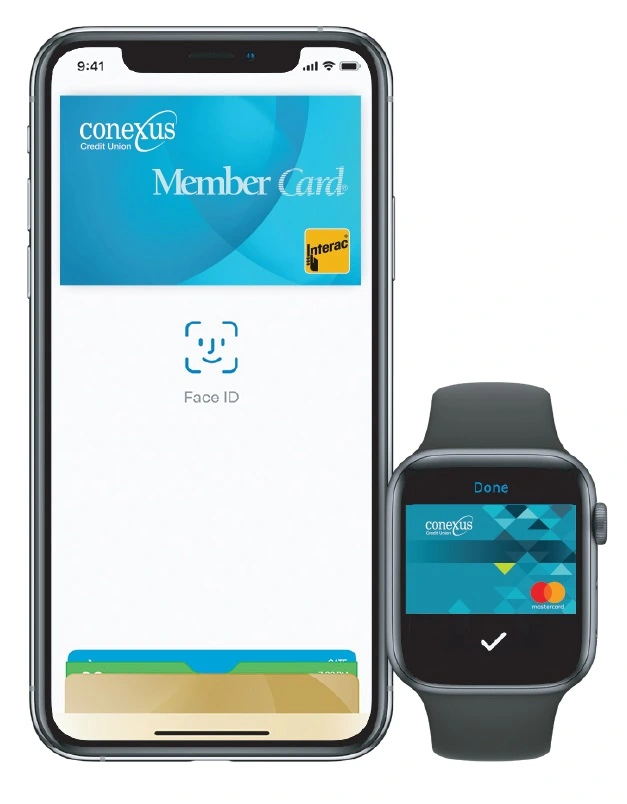
To pay with an iPhone X, double click the side button then glance at your iPhone to authenticate with the Face ID or enter your passcode. Hold the top of the iPhone within a few centimeters of the contactless reader until you see “Done” and a checkmark on the display.
Apple Watch
Double click the side button and hold the display of your Apple Watch within a few centimeters of the contactless reader. Wait until you feel a gentle tap. You’ll see “Done” and a checkmark on the display letting you know your payment was approved.